Appearance
SEO Checklist
1. Indexable
🔎
Important SEO content must be indexable by search engine
Text can be indexed better than image

❌ Image is not preferred to represent important SEO content
html
<img src="gens-conference-banner.png" />TIP
If you decide to still go with img due to time constraint, do remember to at least add an alt tag and a meaningful file name
✅ Text is preferred to represent important SEO content
html
<div>
	<h1>GenerationS</h1>
	<h2>Pastors Conference</h2>
	<h3>23 - 27 July 2026, Singapore</h3>
	<p>Registration to open at a later time</p>
</div>
Visible content can be indexed better than hidden content

The lyrics tab in Came Up New Resources page is initially hidden using v-if.
❌ Hidden content is not preferred to represent important SEO content
vue
<div v-if="selectedTab === TAB.LYRICS">
	<h1>Lyrics section</h1>
	...
</div>
✅ Visible content is preferred to represent important SEO content
Instead of using v-if, host the lyrics section in its own page without v-if logic.
e.g. /music/came-up-new/resources/lyrics
vue
<div>
	<h1>Lyrics section</h1>
	...
</div>
2. Presentable
🔎
Important SEO content must be presentable to search engine
Images or files must have presentable metadata

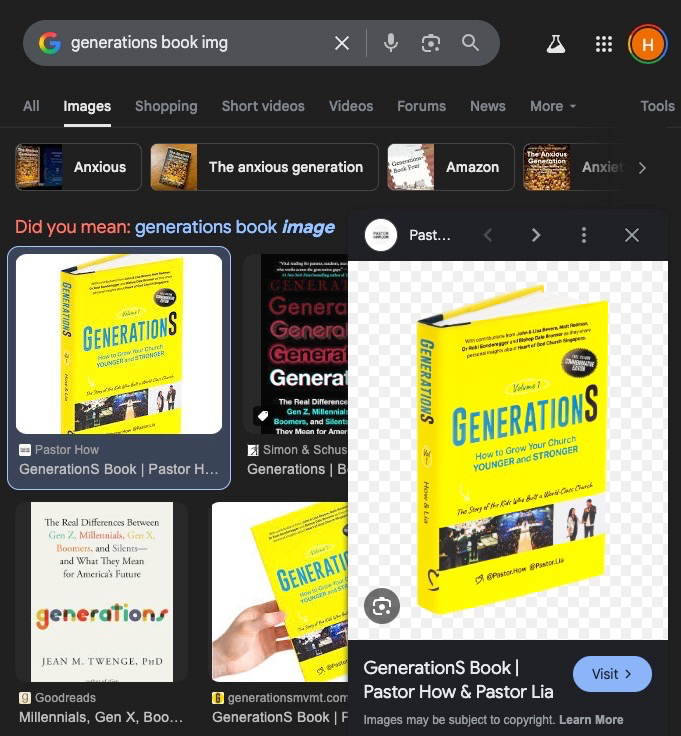
❌ File names are not presentable
html
<img src="image-7960.jpg" />
<img src="asset-1.png" />
<a href="flyer-version-10.pdf" target="_blank" />
✅ File names are presentable
html
<img src="Heart-of-God-Church-Logo.jpg" />
<img src="Heart-of-God-Church-on-Straits-Times-Interfaith-Blood-Donation-Drive.png" />
<a href="HeartKidz-Flyer-July-2025.pdf" target="_blank" />
❌ Images do not have alt tags
html
<img src="Heart-of-God-Church-Logo.jpg" />✅ Images have presentable alt tags
html
<img alt="Heart of God Church logo" src="Heart-of-God-Church-Logo.jpg" />Uppercased text content must be presentable
❌ Uppercased text are hard coded
html
<h1>HELLO I'M AN UPPERCASED HEADER!</h1>TIP
Depending on the requirements, this might be preferred. So do check with the PM!
✅ Uppercased text are styled
html
<h1 class="uppercase">Hello I'm an uppercased header!</h1>3. Hierarchical
🔎
Important SEO content must be represented in proper hierarchy
Search engines show preference for keywords appearing in heading tags.
Example of hierarchy:
<h1> > <h2> > <h3> > <p> > <span>
❌ SEO Content have no hierarchy even though there is a difference in importance
html
<div>
  <p>I'm super important!</p>
</div>

<div>
  <p>I'm not as important as the above!</p>
</div>

<div>
  <p>I'm least important!</p>
</div>

<p>I'm just a body text...</p>
✅ SEO Content have proper hierarchy
html
<div>
    <h1>I'm super important!</h1>
</div>

<div>
    <h2>I'm not as important as the above!</h2>
</div>

<div>
    <h3>I'm least important!</h3>
</div>

<p>I'm just a body text...</p>
TIP
Do check with the UI/UX & PM if you're unsure of the order of importance of the SEO content in the page!
4. Meaningful
🔎
Important SEO content must be represented in a meaningful way
Semantic HTML is preferred by search engines
Example of semantic HTML elements:
html
<main></main>
<section></section>
<nav></nav>
<footer></footer>
<form></form>
and many more!
❌ SEO Content are represented in non-semantic HTML
html
<div>
  <p>I'm the header!</p>
</div>

<div>
  <p>I'm the main content!</p>
	<div>I'm a section!</div>
</div>

<div>
  <p>I'm the footer!</p>
</div>
✅ SEO Content are represented in semantic HTML
html
<header>
    <p>I'm the header!</p>
</header>

<main>
    <p>I'm the main content!</p>
    <section>I'm a section!</section>
</main>

<footer>
    <p>I'm the footer!</p>
</footer>
WARNING
While it's good to convert the important div in your page to semantic HTML, you don't have to overdo it for the less significant divs!
5. Performant
⚡
Website is performant
How do we measure performance of the website to optimise its SEO?
How to export from Figma the most performant way?
- What file type should I use?
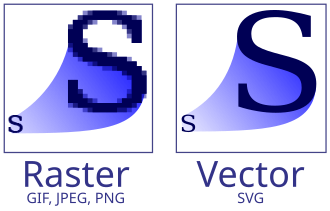
.svg - for all vector images
.png - for transparent images
.gif - for animated images
Do we really need GIF?
Do discuss with your PMs & UI/UX if GIF is really the only way. Google prefers videos over GIFs.
.jpg - for anything else
You can use Squoosh, to further optimise the image size
- How many x should I export in?
Mobile image (< 400px in image width) - x4
Tablet image (< 1400px in image width) - x2
Desktop image (>= 1400px in image width) - x2
Using nuxt-img to auto optimise images
We use Nuxt Images library to auto optimise images with Cloudflare CDN
Sample usage:
vue
<nuxt-img
  preset="default"
  src="/assets/images/give/life-changing-makeover.png"
  width="744"
  height="570"
  class="w-full"
/>- The
heightandwidthshould be the base resolution of the image. defaultpreset integrates with Cloudflare
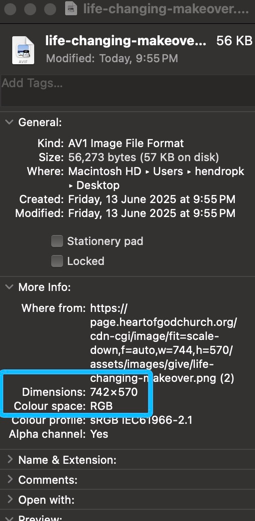
nuxt-img will then construct a Cloudflare optimised URL and auto-insert it into an img tag:
WARNING
Before using nuxt-img, do check with the dev lead whether Nuxt Image has been set up on your repo.
That's all! Your website is ready to be launched!

Want to contribute to this checklist?
Let the dev leads know!